Appearance
Custom languages provide code completion using one of two approaches: Contributor and Reference-based (see 10. Reference Contributor) completion.
Reference: Code Completion
9.1. Define a Completion Contributor
For this tutorial, the simple_language_plugin provides custom completion for values in Simple Language property files. Create a completion contributor by subclassing CompletionContributor. This rudimentary completion contributor always adds "Hello" to the results set, regardless of context:
java
package org.consulo.sdk.language;

import consulo.annotation.component.ExtensionImpl;
import consulo.language.Language;
import consulo.language.editor.completion.*;
import consulo.language.editor.completion.lookup.LookupElementBuilder;
import consulo.language.pattern.PlatformPatterns;
import consulo.language.util.ProcessingContext;
import org.consulo.sdk.language.psi.SimpleTypes;

import jakarta.annotation.Nonnull;

@ExtensionImpl
final class SimpleCompletionContributor extends CompletionContributor {

  @Nonnull
  @Override
  public Language getLanguage() {
    return SimpleLanguage.INSTANCE;
  }

  SimpleCompletionContributor() {
    extend(CompletionType.BASIC, PlatformPatterns.psiElement(SimpleTypes.VALUE),
        new CompletionProvider() {
          public void addCompletions(@Nonnull CompletionParameters parameters,
                                     @Nonnull ProcessingContext context,
                                     @Nonnull CompletionResultSet resultSet) {
            resultSet.addElement(LookupElementBuilder.create("Hello"));
          }
        }
    );
  }

}
9.2. Register the Completion Contributor
The CompletionContributor base class is annotated with @ExtensionAPI. To register the completion contributor with the Consulo, annotate the SimpleCompletionContributor implementation class with @ExtensionImpl.
9.3. Run the Project
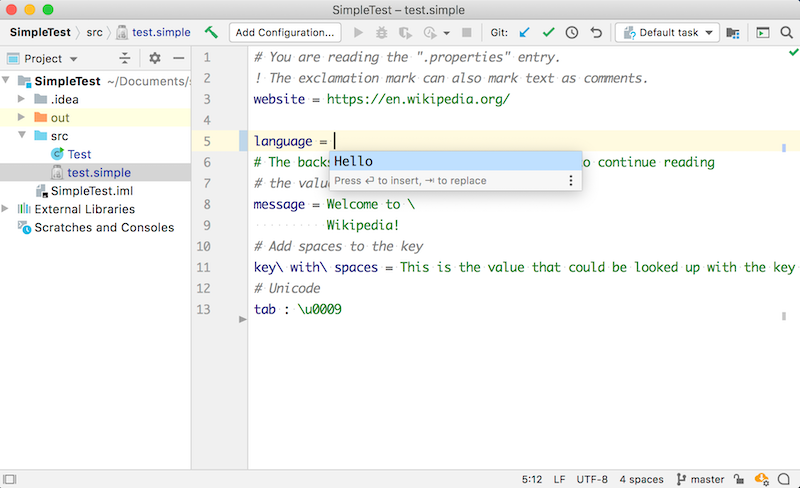
Run the simple_language_plugin in a Development Instance and open the test.simple file. Erase the property "English" and invoke Basic Code Completion. The choice "Hello" is shown: