
Appearance
An Annotator helps highlight and annotate any code based on specific rules. This section adds annotation functionality to support the Simple Language in the context of Java code.
Reference: Annotator
Required Project Configuration Changes
Classes defined in this step of the tutorial depend on consulo.language.psi.PsiLiteralExpression at runtime. Using PsiLiteralExpression introduces a dependency on consulo.modules.java. Beginning in version 2019.2 of the Consulo these dependencies are declared in plugin.xml:
xml
<depends>consulo.modules.java</depends>The dependency is also declared in the pom.xml file as a Maven dependency:
xml
<dependency>
    <groupId>consulo</groupId>
    <artifactId>consulo-java</artifactId>
    <version>${consulo.version}</version>
    <scope>provided</scope>
</dependency>
7.1. Define an Annotator
The SimpleAnnotator subclasses Annotator. Consider a literal string that starts with "simple:" as a prefix of a Simple Language key. It isn't part of the Simple Language, but it is a useful convention for detecting Simple Language keys embedded as string literals in other languages, like Java. Annotate the simple:key literal expression, and differentiate between a well-formed vs. an unresolved property.
INFO
The use of new AnnotationHolder syntax, which uses the builder format.
java
package org.consulo.sdk.language;

import consulo.colorScheme.DefaultLanguageHighlighterColors;
import consulo.document.util.TextRange;
import consulo.language.editor.annotation.AnnotationHolder;
import consulo.language.editor.annotation.Annotator;
import consulo.language.editor.annotation.HighlightSeverity;
import consulo.language.editor.inspection.ProblemHighlightType;
import consulo.language.psi.PsiElement;
import consulo.language.psi.PsiLiteralExpression;
import org.consulo.sdk.language.psi.SimpleProperty;

import jakarta.annotation.Nonnull;

import java.util.List;

final class SimpleAnnotator implements Annotator {

  // Define strings for the Simple language prefix - used for annotations, line markers, etc.
  public static final String SIMPLE_PREFIX_STR = "simple";
  public static final String SIMPLE_SEPARATOR_STR = ":";

  @Override
  public void annotate(@Nonnull final PsiElement element, @Nonnull AnnotationHolder holder) {
    // Ensure the PSI Element is an expression
    if (!(element instanceof PsiLiteralExpression literalExpression)) {
      return;
    }

    // Ensure the PSI element contains a string that starts with the prefix and separator
    String value = literalExpression.getValue() instanceof String ? (String) literalExpression.getValue() : null;
    if (value == null || !value.startsWith(SIMPLE_PREFIX_STR + SIMPLE_SEPARATOR_STR)) {
      return;
    }

    // Define the text ranges (start is inclusive, end is exclusive)
    // "simple:key"
    //  01234567890
    TextRange prefixRange = TextRange.from(element.getTextRange().getStartOffset(), SIMPLE_PREFIX_STR.length() + 1);
    TextRange separatorRange = TextRange.from(prefixRange.getEndOffset(), SIMPLE_SEPARATOR_STR.length());
    TextRange keyRange = new TextRange(separatorRange.getEndOffset(), element.getTextRange().getEndOffset() - 1);

    // highlight "simple" prefix and ":" separator
    holder.newSilentAnnotation(HighlightSeverity.INFORMATION)
        .range(prefixRange).textAttributes(DefaultLanguageHighlighterColors.KEYWORD).create();
    holder.newSilentAnnotation(HighlightSeverity.INFORMATION)
        .range(separatorRange).textAttributes(SimpleSyntaxHighlighter.SEPARATOR).create();

    // Get the list of properties for given key
    String key = value.substring(SIMPLE_PREFIX_STR.length() + SIMPLE_SEPARATOR_STR.length());
    List<SimpleProperty> properties = SimpleUtil.findProperties(element.getProject(), key);
    if (properties.isEmpty()) {
      holder.newAnnotation(HighlightSeverity.ERROR, "Unresolved property")
          .range(keyRange)
          .highlightType(ProblemHighlightType.LIKE_UNKNOWN_SYMBOL)
          // ** Tutorial step 19. - Add a quick fix for the string containing possible properties
          .withFix(new SimpleCreatePropertyQuickFix(key))
          .create();
    } else {
      // Found at least one property, force the text attributes to Simple syntax value character
      holder.newSilentAnnotation(HighlightSeverity.INFORMATION)
          .range(keyRange).textAttributes(SimpleSyntaxHighlighter.VALUE).create();
    }
  }

}
TIP
If the above code is copied at this stage of the tutorial, then remove the line below the comment "** Tutorial step 18.3 …" The quick fix class in that line is not defined until later in the tutorial.
7.2. Register the Annotator
The SimpleAnnotator implementation is registered with the Consulo by annotating the class with @ExtensionImpl. The base interface Annotator is annotated with @ExtensionAPI, so the Consulo discovers the implementation automatically.
7.3. Run the Project
As a test, define the following Java file containing a Simple Language prefix:value pair:
java
public class Test {
    public static void main(String[] args) {
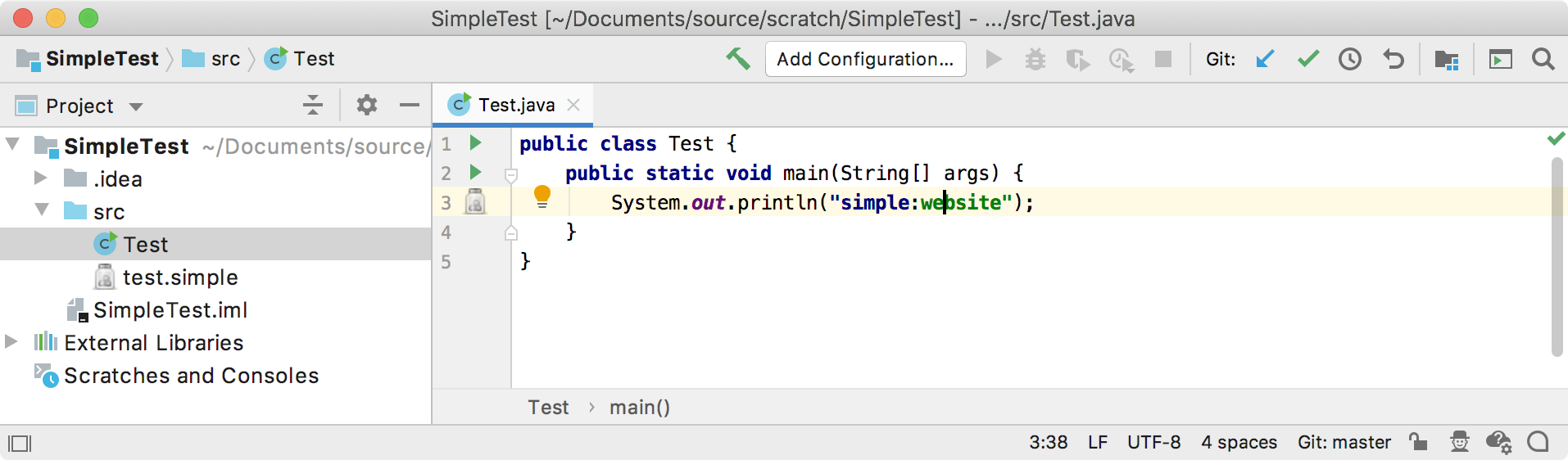
        System.out.println("simple:website");
    }
}
Open this Java file in an IDE Development Instance running the simple_language_plugin to check if the IDE resolves a property:
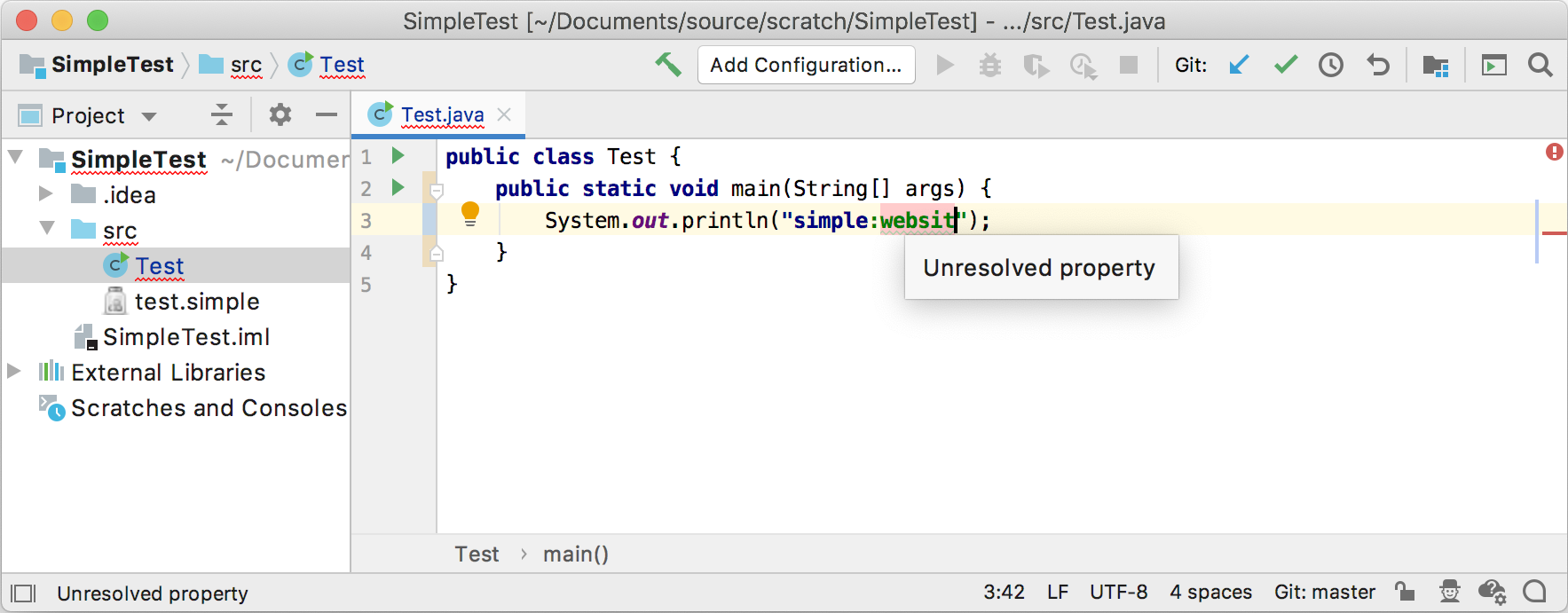
If the property is an undefined name, the annotator flags the code with an error.
Try changing the Simple Language color settings to differentiate the annotation from the default language color settings.