Appearance
This page provides high-level overview of External System sub-system. There are multiple project management systems (Apache Maven, Gradle, sbt etc) and it's good to support them at the IDE. Luckily, they all provide a similar set of facilities from the integration point of view:
- build IDE project from external system config (
pom.xml,build.gradleetc); - provide a list of available tasks;
- allow to execute a particular task;
- ...
That means that we can separate external system-specific logic and general IDE processing. 'External system' sub-system provides simple API for wrapping external system and extensible IDE-specific processing logic.
Project Management
Project Data Domain
General External system wrapper is required to be able to build project info on the basis of the given external system config. That information is built using in terms of DataNode, Key and ExternalEntityData.
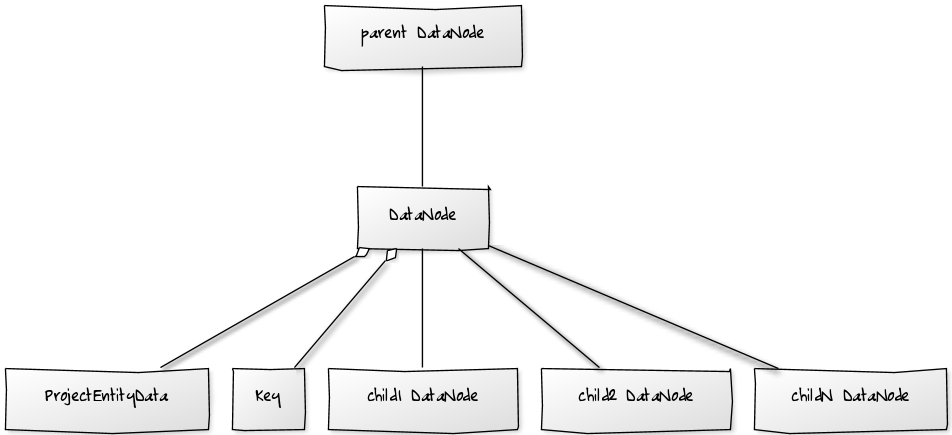
Here DataNode class is just a holder for the target data (data type is defined by the Key). Multiple DataNode objects might be organized in directed graph where every edge identifies parent-child relation.
For example, simple one-module project might look as below:
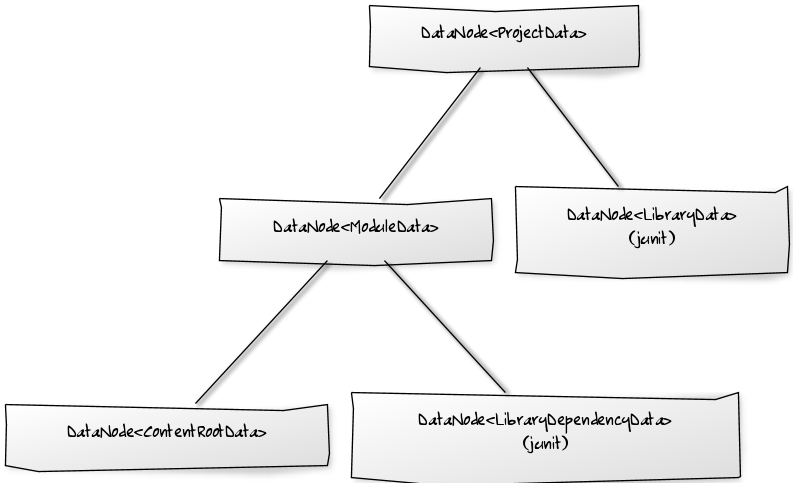
Consequence The IDE provides a set of built-in Keys and ExternalEntityDatas but any external system integration or third-party plugin developer might enhance project data by defining her own Key and ExternalEntityData and storing them at a child of appropriate DataNode.
Managing Project Data
We need to process project data is built on external system config basis. Here comes ProjectDataService. It is a strategy which knows how to manage particular ExternalEntityData. For example, when we want to import a project from external model, we can start by the top level DataNode which references project info and then import its data using corresponding service.
Custom services can be defined via 'externalProjectDataService' extension.
The good thing is that we can separate project parsing and management here. That means that a set of DataNode, Key and ProjectDataServices can be introduced for particular technology and then every external system integration can build corresponding data if necessary using it.
Importing from External Model
Consulo provides standard API for that. Namely, ProjectImportBuilder and ProjectImportProvider. There are two classes built on template method pattern - AbstractExternalProjectImportBuilder and AbstractExternalProjectImportProvider. Concrete implementations are registered by annotating them with @ExtensionImpl.
Here is an example from the gradle integration plugin:
java
@ExtensionImpl
public class GradleProjectImportProvider extends AbstractExternalProjectImportProvider {
    // ...
}

@ExtensionImpl
public class GradleProjectImportBuilder extends AbstractExternalProjectImportBuilder {
    // ...
}
Note that AbstractExternalProjectImportBuilder is built on top of the 'external system settings' controls.
Auto-Import
It's possible to configure external system integration to automatically refresh project structure when external project's config files are modified.
TIP
Since 2020.1, auto-import cannot be disabled by user.
Auto-Import for ExternalSystemManager implementation
Describe project's settings files to track by having external system ExternalSystemManager implement ExternalSystemAutoImportAware.
INFO
ExternalSystemAutoImportAware.getAffectedExternalProjectPath() is called quite often, that's why it's expected to return control as soon as possible. Helper CachingExternalSystemAutoImportAware class might be used for caching, i.e. ExternalSystemManager which implements ExternalSystemAutoImportAware can have a field like new CachingExternalSystemAutoImportAware(new MyExternalSystemAutoImportAware()) and delegate ExternalSystemAutoImportAware.getAffectedExternalProjectPath() calls to it.
Auto-Import for Standalone External Systems
Some external systems don't have ExternalSystemManager (e.g., Maven), but they also can use auto-import core to track changes in settings files. For this, implement ExternalSystemProjectAware interface that describes settings files for tracking and an action to reload project model. Then register the instance with ExternalSystemProjectTracker to start tracking.
INFO
Multiple ExternalSystemProjectAware instances can correspond to a single external system. It allows performing project reload differently depending on the set of settings files (project aware per settings file, per module, per external project, etc.).
Icon for Reload Notification
Since 2020.1, the icon for reload notification can be specified per external system. Implement ExternalSystemIconProvider and annotate your implementation with @ExtensionImpl to register it. Alternatively, set reloadIcon field if external system implements ExternalSystemIconProvider directly.
Settings
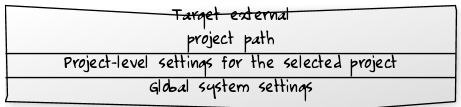
The general idea is that all external system settings controls are represented by implementations of ExternalSystemSettingsControl interface. There are also external system project-local settings and global external system settings. So, basically particular external system settings UI looks as below:
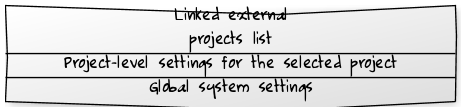
It's recommended to extend from AbstractExternalProjectSettingsControl for implementing project-level settings control as it already handles some of them.
Similar approach is used for providing 'import from external system' UI - implementation is expected to extend AbstractImportFromExternalSystemControl and it has not linked external projects list but target external project path control: